


How to Make an Invoice Template (that Fits Your Workflow)
3min read
|
May 20, 2026
Most invoice templates online are generic: same fields, same structure, regardless of the job.
But in reality, a good invoice template should match how you actually work—not the other way around.
A freelancer, a construction contractor, and a small studio all bill differently. If your template doesn't reflect that workflow, you'll either waste time editing it or miss important details.
This guide breaks down how to build an invoice template that fits your workflow—and how different industries should structure theirs.
Download a General Invoice Template
Start with a simple, general-purpose invoice template as your base.
This gives you:
- Basic structure (header, items, totals)
- Standard formatting
- A quick starting point
You can use any standard template as a foundation.
Add Your Logo and Business Information
Customize it with your identity:
- Business name
- Logo (optional)
- Email/phone
- Address (if needed)
This helps make your invoice clear and professional.
Make sure your template includes the essential billing fields:
- Invoice number
- Invoice date
- Due date
- PO number (if required by your clients)
These are important for tracking and communication.
Add Fields Based on Your Industry
This is where most generic templates fail.
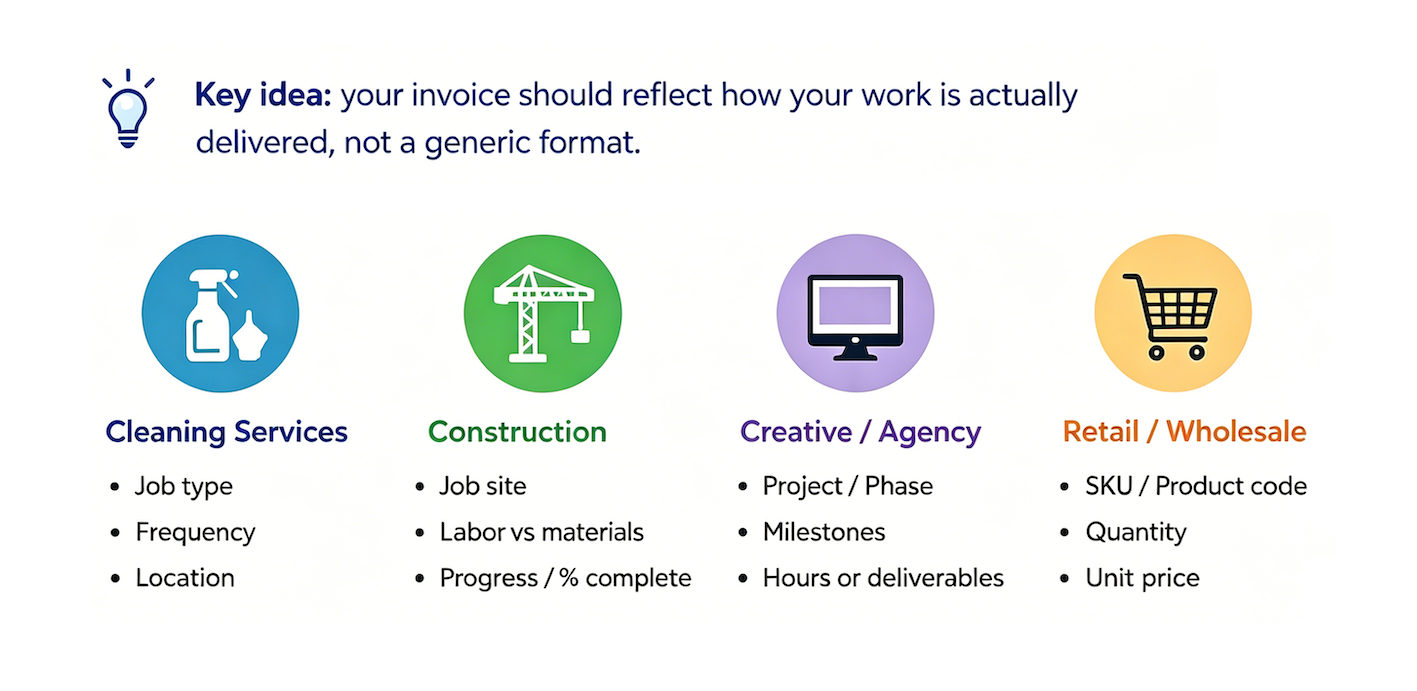
Different industries require different invoice fields depending on how work is delivered and billed.
For example, cleaning services invoices often include job type, frequency, and location, while construction invoices may include job site details and material breakdown.
Our industry invoice templates break down how invoice structure varies by industry.
The key idea: your invoice should reflect how your work is actually delivered, not a generic format.
Remove Unnecessary Fields
If a field doesn't affect billing, tracking, or client clarity, it doesn't need to be in your template.
Remove anything that:
- You never use
- Confuses clients
- Doesn't affect billing or tracking
Keep it clean and focused.
Adjust Line Items to Match Your Services and Workflow
Project-based Workflow (Design, Dev, Consulting)
You usually work on defined deliverables. Your invoice should support:
- Milestones or phases
- Fixed-price items
- Project references
Example:
- Website redesign – Phase 2
- Brand identity package
Key idea: track progress, not just time
Hourly Workflow (Freelancers, Agencies, Contractors)
You bill time instead of deliverables. Your invoice should include:
- Hours per task
- Hourly rate
- Optional time breakdown by date or role
Example:
- UX design – 12 hours × $80/hr
- Meetings – 3 hours × $80/hr
Key idea: make time transparent
Field Service Workflow (Construction, Repair, Blue-collar Work)
Work happens on-site, often with materials. Your invoice should include:
- Labor vs materials separation
- Job site or location
- Equipment or material cost breakdown
Example:
- Labor: Plumbing repair – 5 hours
- Materials: Pipes, fittings, sealant
Key idea: separate labor from cost inputs
Product / Resale Workflow (Small Retail, Wholesale, Ecommerce)
You’re selling physical goods. Your invoice should include:
- SKU or product codes
- Quantity per item
- Unit cost + bulk pricing
Example:
- Item A – SKU#123 – 10 units
- Item B – SKU#456 – 5 units
Key idea: Inventory clarity matters more than description
Check Calculations (Subtotal, Discount, Tax)
Before saving your template, double-check:
- Subtotal is correct
- Discounts are applied properly
- Tax calculation is accurate
- Final total matches expectations
Small errors here can lead to payment delays or confusion.
Save Your Finished Invoice Template
Once everything is ready:
- Save it as a reusable file (Google Docs / Excel / PDF)
- Keep an editable version for future updates
- Duplicate it for each new invoice
A good template should reduce work, not add more steps.
If you don’t want to build your invoice template manually, you can also use an invoice generator or invoice software to create invoices.
This can be a quicker way to get started, especially if you prefer not to set everything up from scratch.
Most Popular Pages


Try Invoice Zip Today
Start Sending Invoices, Building Reports, Saving Office
Time and Get Paid Faster.