


15 Common Invoice Mistakes and How to Avoid Them
11min read
|
Sep 04, 2026
Creating an invoice is one of the most routine tasks for a small business, freelancer, or contractor. But a small mistake can cause much more work later. An incorrect total may lead to a billing dispute. A missing due date can delay payment. An unclear service description may make a customer question a charge.
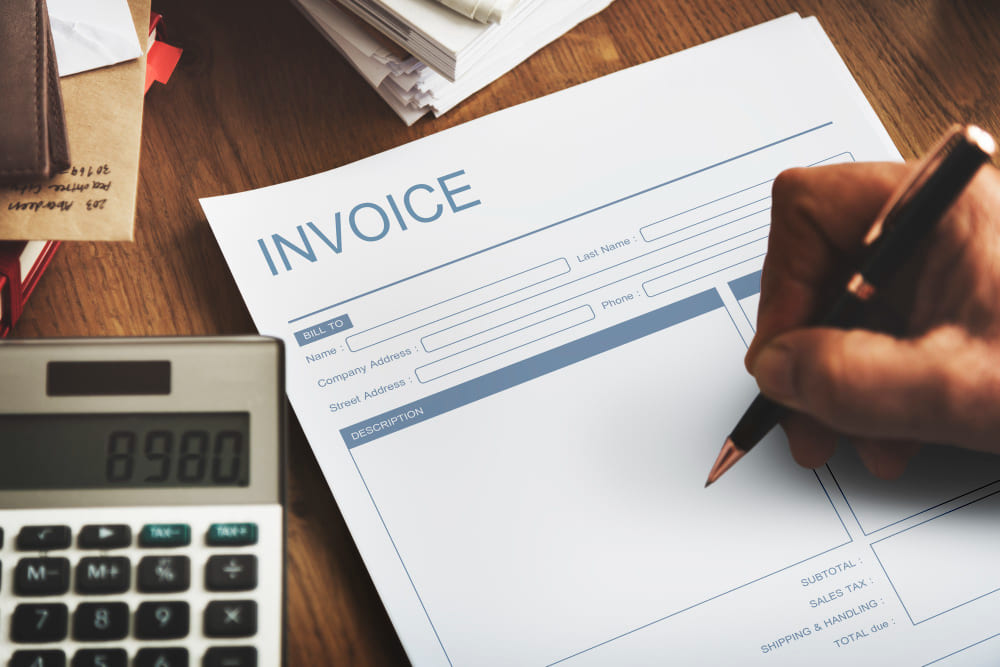
Some invoice errors are easy to overlook because the invoice still looks complete at first glance. The problem may only appear when the customer tries to pay, when an accounting team reviews the invoice, or when you need to follow up on an overdue payment.
The good news is that most invoice mistakes are preventable. A consistent invoicing process and a quick review before sending can help you catch errors early.
Here are 15 common invoice mistakes and what you can do to avoid them.
1. Missing Essential Business Information
An invoice should clearly identify the business or person requesting payment. Leaving out basic business information can make an invoice look incomplete and may make it harder for the customer to process the payment.
Depending on your business, this information may include your business name, address, email address, phone number, website, and other details required for billing or tax purposes.
For example, a freelancer might send an invoice that only includes their personal name and the amount due. The customer may not know how to contact them or what information to use for their accounting records.
Some businesses may also need to include a tax identification number, business registration information, or other required details.
How to avoid it: Create a standard invoice layout that always includes your core business information. Check whether your industry or location requires any additional information.
2. Using Incorrect or Duplicate Invoice Numbers
An invoice number is more than a label. It gives you and your customer a way to identify a specific billing transaction.
A duplicate or inconsistent invoice number can cause problems when you are tracking payments, updating accounting records, or discussing an invoice with a customer. It can also make it difficult to determine whether a customer has already been billed.
For example, if you accidentally send two invoices with the same number, the customer may wonder whether they are duplicate invoices or separate charges.
You do not need a complicated numbering system. A simple sequence such as INV-001, INV-002, and INV-003 can work well for many small businesses.
How to avoid it: Use a consistent numbering system and assign a unique number to every invoice. If you use an invoice maker, let the system help maintain the sequence.
3. Forgetting the Invoice Date
The invoice date tells the customer when the invoice was issued. It can also affect the payment schedule.
This becomes especially important when you use payment terms based on the invoice date. For example, a Net 30 invoice generally gives the customer 30 days to pay from the agreed starting date. If the invoice date is wrong, the customer may calculate the due date differently from you.
An incorrect date can also make your financial records harder to reconcile.
This mistake is easy to make when you create several invoices at once or reuse an old invoice as a starting point.
How to avoid it: Check the invoice date every time you create an invoice. If you use a previous invoice as a template, make sure you update the date before sending it.
4. Setting the Wrong Due Date
The due date tells your customer when payment is expected. A wrong or missing due date can create confusion and make payment follow-ups more difficult.
For example, if you agreed to Net 15 terms but accidentally enter a due date that is 30 days after the invoice date, the customer may reasonably expect the longer payment period.
The opposite can also happen. If you set a due date earlier than the agreed terms, the customer may dispute the invoice or delay payment while the issue is clarified.
Payment terms and due dates should therefore match the agreement you have with your customer.
How to avoid it: Confirm the agreed payment terms before creating the invoice. You can calculate the invoice due date before sending it, especially when you enter dates manually.
5. Leaving Out Payment Terms
Customers should not have to guess when an invoice needs to be paid.
Payment terms explain the expected payment timing and any important conditions related to the invoice. Common terms include Net 15, Net 30, and Due Upon Receipt.
Without clear terms, a customer may not know whether payment is expected immediately or within a specific number of days. This can become particularly problematic when you need to follow up on an unpaid invoice.
Payment terms are also useful because they establish a clear expectation before the due date arrives.
How to avoid it: Include payment terms on every invoice and make sure they match the terms you agreed upon with the customer. If you charge late fees, explain the applicable terms clearly and calculate late fees according to those terms.
6. Entering the Wrong Quantity or Rate
Incorrect quantities and rates are among the easiest ways to create an inaccurate invoice.
For a freelancer, the mistake could be billing 12 hours instead of 10. For a contractor, it could mean using an outdated labor rate. For a retailer or wholesaler, it could mean entering the wrong number of products.
Even a small difference can affect the final amount and lead to questions from the customer.
This is especially important when your pricing changes over time or when different customers have different agreed rates.
How to avoid it: Compare quantities, hours, rates, and unit prices with the original quote, estimate, contract, time records, or other supporting records before sending the invoice.
7. Calculating the Invoice Total Incorrectly
An invoice total usually depends on several calculations. You may need to add multiple line items, subtract a discount, apply tax, and include additional fees.
A mistake in any one of these calculations can result in the wrong amount due.
For example, an invoice might contain three services with different rates and quantities. If one line item is calculated incorrectly, the subtotal and final amount may also be wrong.
Manual calculations become even more difficult when an invoice contains many products, services, or adjustments.
How to avoid it: Review the subtotal, discounts, taxes, fees, and final amount separately. Using an invoice maker that calculates totals automatically can reduce the risk of basic arithmetic errors, but you should still review the final result before sending.
8. Applying the Wrong Tax
Tax is another area where an invoice can easily go wrong.
The tax that applies to an invoice may depend on factors such as your location, the customer's location, the type of product or service, and your business situation. Not every transaction is subject to the same tax requirements.
Common mistakes include using an outdated tax rate, applying tax when it should not be charged, or forgetting to include tax when it is required.
A tax error can affect both the customer's payment and your business records.
How to avoid it: Confirm the tax rules and rates that apply to your transaction before creating the invoice. Keep your tax settings up to date and seek professional tax advice when the applicable rules are unclear.
9. Describing Products or Services Too Vaguely
A customer should be able to understand what they are being charged for by reading the invoice.
A description such as "Consulting — $1,500" may not provide enough information. A more useful description might specify the type of consulting service, the project, or the period covered by the charge.
Detailed descriptions are especially helpful when an invoice contains multiple services or when the customer has to submit it to an accounting or accounts payable department for approval.
Clear descriptions can also reduce disputes because the customer can compare the invoice with the work that was agreed upon or completed.
How to avoid it: Describe each product or service clearly. Include relevant details such as the service period, quantity, project name, hours worked, or unit of measure when appropriate.
10. Leaving Out Payment Instructions
An invoice can be completely accurate and still take longer to get paid if the customer does not know how to pay it.
Payment instructions should tell the customer which payment methods you accept and provide the information needed to complete the payment.
Depending on your business, this might include bank transfer details, a payment link, PayPal information, check instructions, or another payment method.
For example, simply writing "Payment by bank transfer" does not give the customer enough information to actually make the transfer.
How to avoid it: Include a clearly labeled payment section on your invoice. Provide the necessary payment details and make sure they are current. If you accept multiple payment methods, list the available options clearly. A blank invoice template comes with that payment section already labeled, so the details are the only thing left to fill in.
11. Sending an Invoice Without Reviewing It
Creating an invoice quickly is useful, but sending it without a final review can create avoidable problems.
A typo in a customer's name may be minor. A wrong bank account number, payment email, invoice total, or due date can be much more serious.
It is also easy to leave information from a previous invoice when you duplicate an existing document. You might accidentally send an invoice containing another customer's address, old pricing, or an outdated service description.
How to avoid it: Make a final review part of your invoicing process. Before sending, check the customer information, invoice number, dates, line items, quantities, rates, taxes, total, payment terms, and payment instructions.
12. Using Incorrect Customer or Billing Information
Customer information needs to be accurate, especially when you are billing another business.
Using an old company name, incorrect billing address, or wrong contact information can delay invoice processing. Some companies also have specific requirements for invoices, such as a purchase order number, billing address, project number, or accounts payable contact.
A customer may have changed their business name or billing process since your last project. Reusing old information without checking it can therefore cause problems.
How to avoid it: Confirm the customer's billing information before creating the invoice, particularly for new customers or large business clients. If the customer provides specific invoicing requirements, keep them with your customer records.
13. Charging for Work That Wasn't Clearly Agreed Upon
An invoice should reflect what you and your customer agreed to pay for.
Problems can arise when an invoice includes additional work, materials, fees, or expenses that were not clearly discussed beforehand. Even if the charge seems reasonable from your perspective, the customer may not recognize it as part of the original agreement.
For example, a contractor may complete additional work during a project but add the charge to the final invoice without documenting the change. The customer may then question the unexpected amount.
How to avoid it: Keep your quotes, estimates, contracts, and change orders organized. When the scope of work or price changes, communicate the change with the customer and obtain approval when appropriate.
14. Sending the Invoice to the Wrong Person
The person who requested your work is not always the person responsible for processing payment.
A small business may have one person handling everything, but larger organizations often have separate purchasing, finance, or accounts payable teams. If you send the invoice only to your project contact, it may sit in their inbox until they forward it to the appropriate department.
Some businesses also require invoices to be submitted through a specific email address or billing system.
How to avoid it: Ask your customer who should receive invoices and whether they have any specific submission requirements. For recurring customers, keep the correct billing contact and submission instructions in your records.
15. Failing to Keep Records of Sent Invoices
Sending an invoice is not the end of the invoicing process. You also need to know which invoices have been sent, which have been paid, and which are still outstanding.
Without organized records, it is easy to lose track of an unpaid invoice. You might also accidentally send a duplicate invoice or forget to follow up after the due date.
Good records can also help when you need to reconcile payments, review cash flow, prepare financial reports, or answer a customer's question about a previous invoice.
How to avoid it: Keep a record of every invoice you issue. At a minimum, track the invoice number, customer, invoice date, amount, due date, and payment status. Keep copies of the invoices and supporting documents where you can find them easily.
A Simple Invoice Review Before Sending
Before you send an invoice, take a few minutes to check the details. A simple review can help catch most common errors.
Business information
- Your Business name and contact information are correct
- Required business or tax information is included
Customer information
- Customer name is correct
- Billing address and contact information are correct
- Required PO or reference numbers are included
Invoice details
- Invoice number is unique
- Invoice date is correct
- Due date matches the agreed payment terms
- Products or services are clearly described
- Quantities and rates are correct
Amounts
- Subtotal is correct
- Discounts and additional fees are correct
- Tax is calculated correctly
- Final total is accurate
Payment
- Payment terms are included
- Accepted payment methods are clear
- Payment instructions are accurate
Finally, make sure you save a copy of the invoice after sending it and update its payment status when the customer pays.
A good invoice does more than request payment. It creates a clear record of what was provided, how much the customer owes, and when and how the payment should be made. Building a simple review process into your invoicing workflow can help you avoid mistakes and make it easier to get paid on time.
Most Popular Pages
Try Invoice Zip Today
Start Sending Invoices, Building Reports, Saving Office
Time and Get Paid Faster.
