


BEFORE GST
A$100
The original price before tax.
Add GST to a price or find the GST already included in a total. Choose your currency and enter the rate for your transaction to see the GST amount and both prices.
Goods and services tax (GST) is a consumption tax charged on many goods and services. The rate and the types of sales that attract GST depend on the country and the transaction.
GST-registered businesses generally collect GST on taxable sales and may claim credits for eligible GST paid on business purchases. Local rules govern which supplies qualify for zero rating or exemptions and when credits are available.
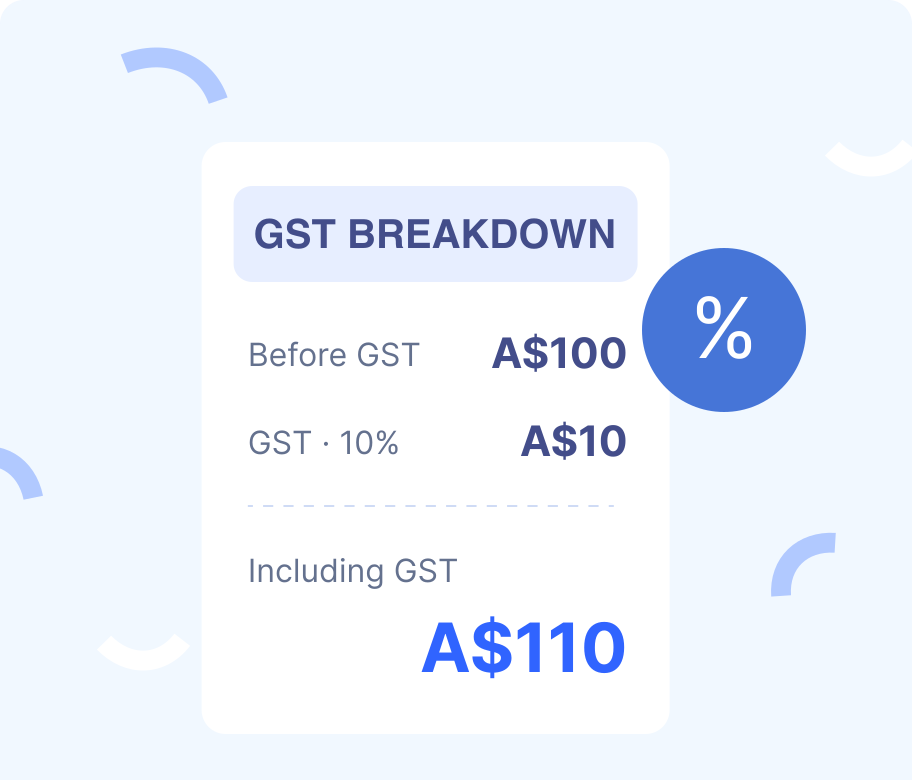
A$100
The original price before tax.
A$10
The tax calculated at the example rate.
A$110
The amount including tax.
· Use one fully taxable amount. GST-free and input-taxed sales have different treatment.
These countries use GST, but their rates and exceptions differ. The examples below show how location and the type of sale affect the applicable rate.
| Country | Standard or main rates | Exceptions and special cases |
|---|---|---|
| AustraliaATO guidance | 10% | Qualifying basic foods and exports may be GST-free. Residential rent is generally input-taxed. |
| New ZealandInland Revenue | 15% | Qualifying exports can be zero-rated. Long-term residential rent is generally exempt. |
| SingaporeIRAS guidance | 9% | Goods exports and qualifying international services can be zero-rated. Certain financial services and residential property sales or leases are exempt. |
| CanadaCRA rate table | 5% federal GST | Participating provinces use combined HST at 13% in Ontario, 14% in Nova Scotia, and 15% in New Brunswick, Newfoundland and Labrador, and Prince Edward Island. Separate provincial sales taxes may apply elsewhere. Basic groceries are generally zero-rated. |
| IndiaGovernment rate overview | 5% and 18% | A 40% rate applies to selected goods and services. Exemptions and other category-specific rates also apply. The rate depends on the classification of the goods or services. |
Use the rate that applies to your transaction. Calculate amounts at different rates separately, and check any separate taxes under the local rules.
Enter a single amount with up to two decimal places. Choose the currency at the right of the amount field.
Choose GST Inclusive to calculate a total with tax from a price before tax. Choose GST Exclusive to calculate the price before tax from a total that already includes GST.
Enter a percentage such as 9 for 9%. Use the rate for your transaction, taking into account the jurisdiction and type of sale.
Check the GST amount, the price before GST, and the GST-inclusive total. Select Copy Result to save the breakdown as text.
Let r be the GST rate as a decimal. Divide the percentage you enter by 100 to get r.
FROM BEFORE GST TO TOTAL
FROM TOTAL TO BEFORE GST
See how the rate you enter changes the GST breakdown when you add or remove tax.

EXAMPLE 01 · GST INCLUSIVE · AUD · 10%
GST = A$250.00 × 10%
Total = A$250.00 + A$25.00
Including GST
A$275.00Choose GST Inclusive, select AUD, enter 250.00, and set the rate to 10%.

EXAMPLE 02 · GST EXCLUSIVE · SGD · 9%
Before GST = S$109.00 ÷ (1 + 9%)
GST = S$109.00 − S$100.00
Before GST
S$100.00Choose GST Exclusive, select SGD, enter 109.00, and set the rate to 9%.

EXAMPLE 03 · GST EXCLUSIVE · NZD · 15%
Before GST = NZ$230.00 ÷ (1 + 15%)
GST = NZ$230.00 − NZ$200.00
Before GST
NZ$200.00Choose GST Exclusive, select NZD, enter 230.00, and set the rate to 15%.

EXAMPLE 04 · GST EXCLUSIVE · CAD · 5%
Before GST = C$210.00 ÷ (1 + 5%)
GST = C$210.00 − C$200.00
Before GST
C$200.00Choose GST Exclusive, select CAD, enter 210.00, and set the rate to 5%.
These examples show how to calculate GST with different currencies and rates. Use the rate applicable to your transaction.
The applicable GST treatment depends on the jurisdiction, the type of supply and the circumstances of the transaction.
Use the standard rate or a rate specific to the goods or services. Check the applicable rules for the transaction.
Qualifying sales are taxed at 0%. Related purchases may qualify for GST credits under local rules.
Exempt sales carry no GST. Local rules determine whether credits are available for related purchases.

Check how the applicable jurisdiction classifies the product or service. The country table shows examples of rates and exceptions.
When a total includes items taxed at different rates, group the amounts by rate before calculating GST.

Check the seller’s GST registration obligations and the rules that determine where the sale is treated as taking place.

Check whether an export or cross-border service qualifies for zero rating under the relevant rules. The conditions depend on the jurisdiction and type of supply.

Selling to another business does not automatically remove GST from an otherwise taxable sale. A GST-registered business customer may be able to claim a credit on an eligible purchase, subject to business use, documentation, and other conditions.
Yes. Enter the percentage that applies to your transaction, including 0% where appropriate. The calculator starts with a 10% Australian example.
Multiply the price before GST by the rate expressed as a decimal, then add the tax to the price. For example, at 9%, S$100.00 before GST becomes S$109.00.
Divide the GST-inclusive total by 1 plus the rate expressed as a decimal to find the price before GST. Subtract that price from the total to find the GST amount. At 15%, NZ$115.00 including GST contains NZ$100.00 before GST and NZ$15.00 GST.
Zero-rated sales are taxed at 0%. Exempt sales carry no GST under the applicable exemption. The distinction can affect whether you may claim credits on related purchases.
Separate the items by their applicable rate and calculate each taxable subtotal separately. Include GST-free items in the final price without adding GST to them.
Choose AUD, NZD, SGD, CAD or INR. The amount field, results and copied breakdown use the selected currency.
The currency controls how amounts are displayed. Set the GST rate separately using the rules for the sale.
A GST-registered business may claim eligible GST on business purchases. Eligibility depends on business use, the GST actually charged, supporting documents, and applicable restrictions. The calculator shows the tax component of a price, rather than an approved credit claim.
Enter an amount already denominated in the selected currency. The calculator adds or removes GST from that amount using the percentage you enter.