


How to Write a Receipt of Payment
9min read
|
Sep 30, 2026
When a customer hands over cash, writes a check, or sends a transfer for goods or services you provided, that transaction deserves written confirmation. A receipt of payment is the document that closes the loop — it tells the buyer "I received your money" and tells you "this sale is settled." This guide covers the essential fields every receipt needs, practical samples for different situations, and how digital records tie back to invoicing.
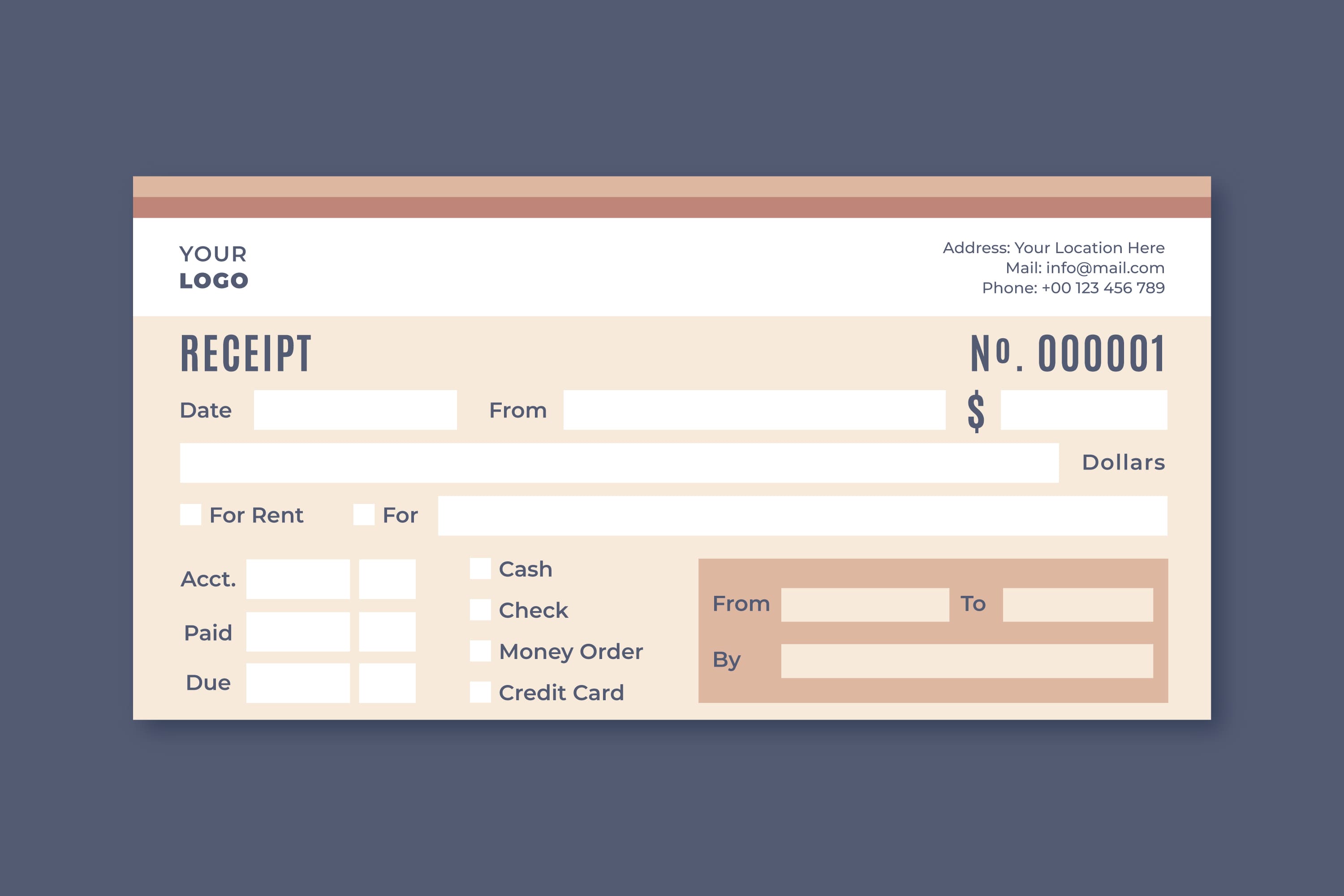
What a Receipt of Payment Proves
A receipt of payment is a written acknowledgment that money changed hands. It is not the same thing as an invoice. An invoice is a request for payment sent before the customer pays; a receipt is the confirmation issued after payment is received. Together, the two documents tell a complete story: the invoice says "you owe this amount" and the receipt says "you paid this amount."
In practice, a receipt proves three things at once:
- That payment was made. The buyer can show it to prove they fulfilled their financial obligation.
- The amount and method. It records how much was paid and whether it was cash, check, card, bank transfer, or another method — useful if questions arise later about partial payments.
- The date and parties involved. It ties a specific sum to a specific person or business on a specific day, which matters for warranties, returns, deposits, and recordkeeping.
When You Need One
You should issue a receipt whenever money is received in a context where proof matters: collecting rent, taking a deposit before starting work, accepting a progress payment on a construction project, selling goods to a walk-in customer, or collecting final payment on an invoice. Even for informal transactions or small service gigs, a simple written receipt prevents misunderstandings about whether payment was made and what it covered.
From the buyer's side, receipts let them claim business expenses, substantiate tax deductions, request warranty service, and resolve billing disputes. From the seller's side, receipts form the backbone of revenue records that feed into bookkeeping and tax preparation. Both sides benefit — and both sides should keep a copy.
Essential Fields Every Payment Receipt Should Include
A receipt does not need to be elaborate, but it should answer "who paid what, when, and for what." At minimum, include these fields:
- Receipt number. A unique identifier (e.g., R-1042) so you can retrieve and reference the receipt later without confusion.
- Date of payment. The date the money was actually received, which may differ from the invoice date or the date you write the receipt.
- Seller or payee information. Your name, business name, and contact information — enough to identify who received the payment.
- Buyer or payer information. The customer's name and, for business customers, their company name.
- Amount paid. The exact amount received, including currency. If there was a partial payment, state the amount paid and the remaining balance.
- Payment method. Cash, check (with check number), credit or debit card, bank transfer, PayPal, or other method. For checks and transfers, include a reference number when possible.
- Description of what the payment was for. A short, clear line describing the goods or services, such as "Web design services — June 2026" or "Office rent — Unit 4B — May 2026."
- Invoice reference. If the payment settles an invoice you previously sent, reference the invoice number. This connects the receipt to the billing record and makes reconciliation straightforward.
- Signature line. For paper receipts and especially for cash payments, a signature or initials from the person receiving the money adds a layer of authenticity.
Optional but Helpful Fields
Depending on your business, you might also add a logo or letterhead at the top, a subtotal/tax/total breakdown, a note about whether payment was in full or partial, and a short return or refund policy line. These extras make the receipt more professional and reduce follow-up questions from customers.
Receipt of Payment Samples by Situation
Different transactions call for slightly different receipts. The table below compares key fields for four common situations.
| Field | Contractor Progress Payment | Landlord Rent Receipt | Service Deposit | Retail Sale |
|---|---|---|---|---|
| Receipt number | Yes | Yes | Yes | Yes |
| Date of payment | Yes | Yes | Yes | Yes |
| Payer and payee details | Yes | Yes | Yes | Yes |
| Amount paid | Yes | Yes | Yes | Yes |
| Payment method | Yes | Yes | Yes | Yes |
| Invoice number reference | Yes | Optional | Yes | Optional |
| Project / milestone description | Yes | Property address + unit | Service being deposited for | Item or category purchased |
| Remaining balance | Yes (progress payments) | No (unless arrears) | No (deposit held until completion) | No |
| Signature line | Recommended | Recommended | Recommended | Optional |
Contractor Progress Payment
For construction and large projects, payments are often made in stages — a deposit, milestone payments, and a final payment. The receipt should describe which milestone the payment covers (e.g., "Phase 2: Framing complete"), reference the original contract or invoice, and clearly state the remaining balance. This keeps both contractor and client aligned on how much has been paid and what is still outstanding.
Landlord Rent Receipt
A rent receipt should include the property address and unit number, the rental period covered (e.g., "June 2026 rent"), the payment method, and whether the amount was paid in full or partial. In some jurisdictions, landlords are legally required to provide rent receipts, especially for cash. Check your local requirements to understand what you must include and how promptly you must issue it.
Service Deposit
When a customer pays a deposit to reserve a service — say, a wedding photographer or catering order — the receipt should state that the amount is a deposit, describe the service it secures, note the expected delivery date, and explain whether the deposit is refundable. This prevents disagreements later about whether the money was a booking fee, a down payment, or an advance on the total.
Retail Sale
Retail receipts are often generated automatically by point-of-sale systems. But if you sell goods informally or run a small shop without POS software, your receipt should list the item or category purchased, the amount, the date, and the payment method. A brief return policy line (e.g., "Returns within 14 days with receipt") sets clear expectations for the buyer.
How to Write a Receipt Step by Step
Writing a receipt is straightforward, but doing it consistently and completely is what makes it valuable. Follow these steps each time you receive payment:
- Start with a receipt number. Use a sequential numbering system (R-001, R-002) or a date-based system (2026-06-15-01). The goal is uniqueness so any receipt can be found later without ambiguity.
- Add the date of payment. Write the date the money was received, not the date you write the receipt if they differ. This matters for accurate recordkeeping.
- Record the payer's information. Write the customer's full name and, for businesses, the company name. Include contact information if available.
- Describe the payment. Write a clear line describing what the payment was for: "Web design services — Invoice INV-2045," "Rent for Unit 4B — May 2026," or "Catering deposit — Event date July 20."
- State the amount and method. Write the amount received and spell out the payment method. For checks, include the check number; for transfers, include a reference or transaction ID when available.
- Reference the invoice. If the payment settles an invoice you sent, write the invoice number on the receipt. This ties the receipt to your billing records and makes reconciliation effortless.
- Note any remaining balance. If the customer made a partial payment, state the amount paid and the balance still due. If paid in full, write "Paid in full" or "Balance: $0.00."
- Sign it. For cash payments especially, add your signature or initials. This confirms that you personally received the money.
- Give a copy to the payer and keep one for yourself. Both parties should have a copy — physical or digital — for their records.
Using a template — a printed pad, a word processor document, or invoicing software — makes this faster and ensures you never skip a field.
Digital Receipts, Recordkeeping, and Proof of Payment
Receipts come in two forms: paper and digital. Paper receipts written by hand or printed from a register are traditional and still common, especially for cash transactions. Digital receipts — sent by email, generated by invoicing software, or produced by a card reader app — are increasingly the norm. Both are valid as proof of payment as long as they contain the essential fields and clearly identify the transaction.
Digital receipts offer practical advantages: they are easy to search, do not fade or get lost as easily as paper, and can be generated automatically when a payment is recorded in invoicing software. When a customer pays an invoice online, the software can instantly produce a receipt referencing the invoice number, amount, and payment method. This connection between invoice and receipt is one of the strongest reasons to use invoicing software.
How Long to Keep Receipts
As a general practice, keep copies of all payment receipts for several years. How long depends on your location, business type, and applicable tax and accounting rules. Because rules differ by country, state, and business structure, check your local requirements or consult a tax professional to determine the retention period that applies to you.
What a Receipt Proves to Tax Authorities
From a tax standpoint, receipts serve as evidence that income was received (for the seller) and that an expense was incurred (for the buyer). If audited or asked to substantiate your filings, receipts are among the primary documents you may need to produce. For the seller, a receipt corroborates reported revenue. For the buyer, it substantiates a deductible expense or cost basis for an asset. Maintaining complete, organized receipt records can be essential if your tax position is ever questioned.
Tax rules vary widely and change over time. This article is not legal or tax advice. Check your local requirements or consult a qualified tax professional.
Receipt of Payment FAQ
Is a receipt the same as an invoice?
No. An invoice is sent before payment to request money; a receipt is issued after payment to confirm it was received. The receipt often references the invoice number to connect the two documents in your records.
Do I have to give a receipt for every payment?
In many business contexts, providing a receipt is expected and in some cases required. For cash payments especially, issuing a receipt is strongly recommended because there is no automatic digital trail as with card or bank transfer payments. Certain situations — such as landlords collecting cash rent — may carry legal requirements. Check your local requirements to understand what applies to your business.
Can a receipt be handwritten?
Yes. A handwritten receipt is valid as long as it contains the essential fields: receipt number, date, payer and payee information, amount, payment method, and description of what was paid for. Many businesses prefer printed or digital receipts for a professional look, but a clear handwritten receipt on a numbered pad is acceptable.
What if the payment was only partial?
Write the amount received, note that it was a partial payment, and clearly state the remaining balance. Reference the original invoice number so the partial payment tracks against the total due. When the customer pays the balance, issue a final receipt marked "Paid in full" referencing the same invoice.
Should I connect receipts to my invoicing system?
Yes, whenever possible. Linking a receipt to its corresponding invoice — by referencing the invoice number — creates a clean audit trail from billing through payment. Invoicing software typically does this automatically: when a payment is recorded against an invoice, the software generates a receipt carrying the invoice number, amount paid, and payment method. This saves time, reduces errors, and makes bookkeeping easier to reconcile.
Most Popular Pages


Try Invoice Zip Today
Start Sending Invoices, Building Reports, Saving Office
Time and Get Paid Faster.
