


How to Track Unpaid Invoices
6min read
|
Sep 04, 2026
When you only have a few invoices, tracking payments is usually simple. You can save each invoice as a file, keep your files organized, and check an invoice whenever you need to know whether a customer has paid.
But as your business grows, keeping track of invoices this way can become harder. You may have dozens or even hundreds of invoice files to look through. At that point, finding unpaid invoices and understanding your outstanding payments can take much more time.
There are several ways to make this process easier. You can start by keeping your invoice files organized, then use an invoicing software to quickly find unpaid invoices and analyze your outstanding payments.
Keep Your Invoice Files Organized
When you only send a small number of invoices, saving each invoice as a file may be enough.
You can organize your files into folders by month, customer, or another system that makes sense for your business. Giving each invoice a clear file name can also make it easier to find later.
For example, you might save your invoices by month and include the invoice number and customer name in each file name.
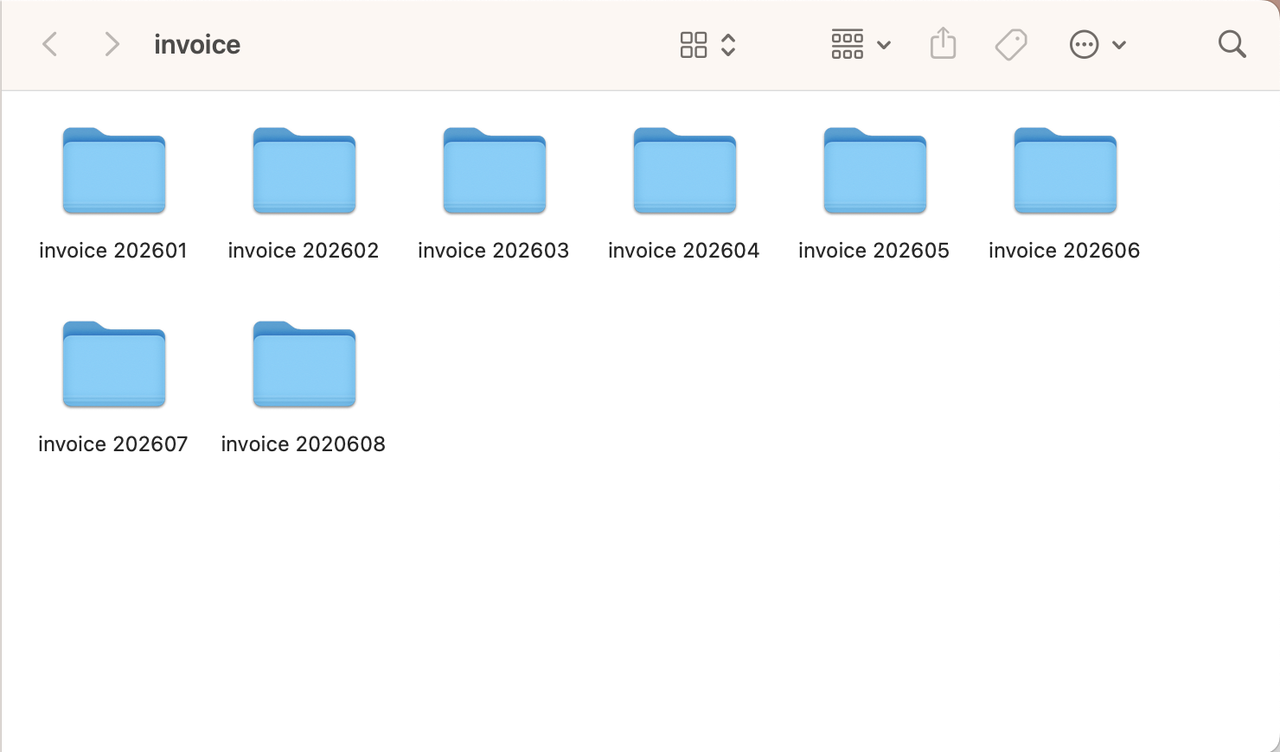
This approach works well when you only have a small number of invoices to manage. If you send 10 invoices a month, for example, finding one particular invoice in your folders is usually not difficult.
The problem is that the number of files keeps growing.
After a year, those 10 invoices a month have already become more than 100 files. If you want to check whether a particular customer has paid, you first need to find the right invoice. If you want to find every invoice that is still unpaid, you may have to go through many files one by one.
This is when file storage alone starts to become less convenient. You need an easier way to see which invoices are still outstanding.
Use Invoice Software to Find Unpaid Invoices
Once you have a large number of invoices, checking individual files to find unpaid payments can quickly become tedious.
This is where invoicing software can make the process easier. Instead of searching through folders, you can keep your invoices in one place and use payment status to find the invoices that still need attention.
With Invoice Zip, you can view your invoices from the Invoices section and filter them by payment status.
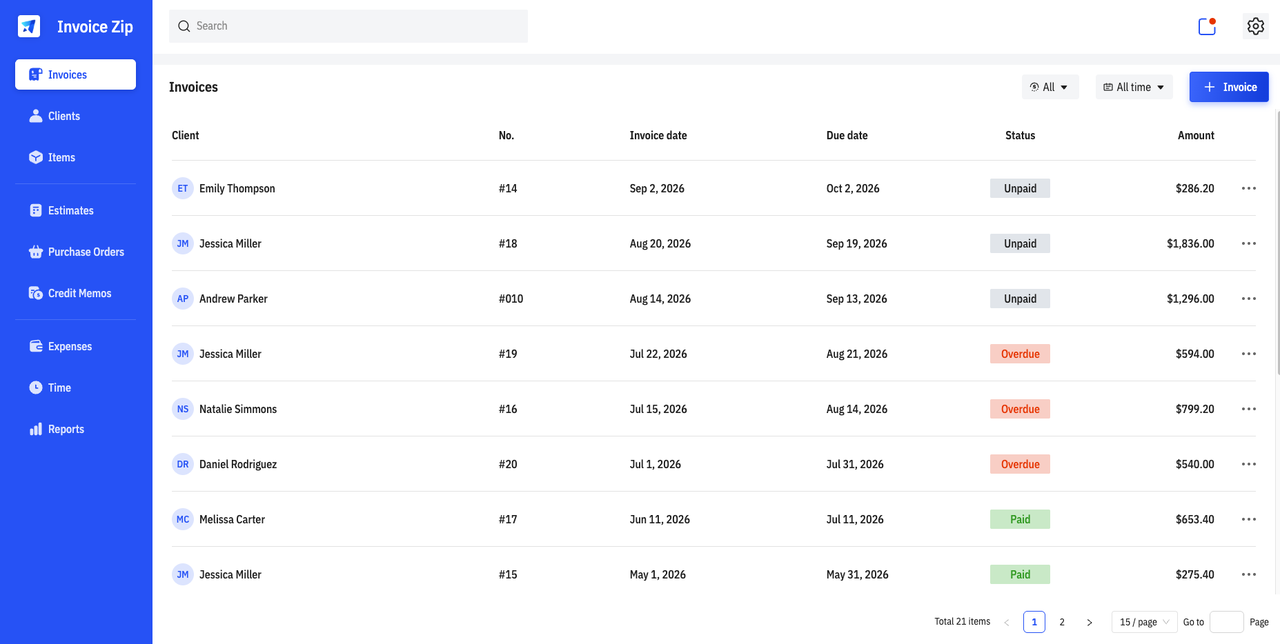
If you want to see which invoices have not been paid, select the Unpaid filter.
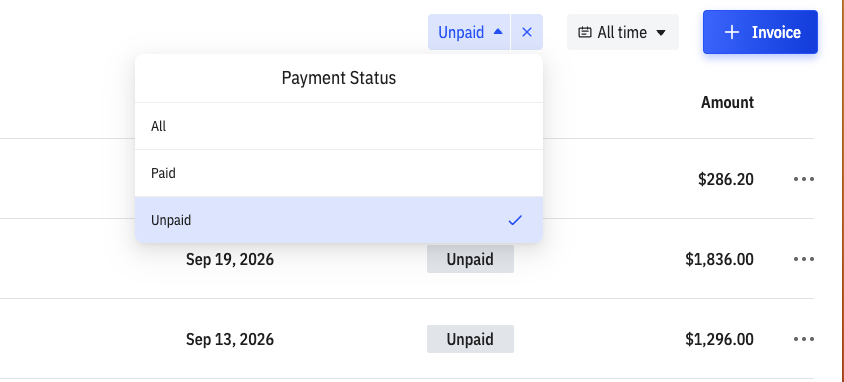
The list will then show the invoices that are currently unpaid, so you don't have to check every invoice individually.
For example, if you have sent 50 invoices over the past few months and only five are still unpaid, you can filter by Unpaid and focus on those five invoices.
This is useful for regular payment follow-ups. You can quickly see which customers still have outstanding invoices and review the relevant invoice details before following up on unpaid invoices.
The Unpaid filter is especially useful when you want a quick answer to a straightforward question:
Which invoices have not been paid yet?
But sometimes that isn't the only question you need to answer.
If you have several unpaid invoices, you may also want to know how long they have been outstanding, which customers or transactions account for most of the unpaid balance, or whether unpaid invoices have started to build up during a particular period.
For that, you need to look beyond the invoice list.
Use Invoice Reports to Understand Your Unpaid Invoices
The unpaid invoice list tells you what is currently outstanding. Reports can help you understand more about those outstanding payments.
Invoice Zip provides reports that let you look at your sales and invoices from different angles. Two reports are particularly useful when you want to understand your unpaid invoices: Custom Aging and Sales Journal.
Use Custom Aging to See How Long Invoices Have Been Unpaid
An unpaid invoice from a few days ago is different from one that has been outstanding for several weeks or months.
If you have many unpaid invoices, looking at them as one group does not tell you how old those balances are.
The Custom Aging report gives you a way to look at outstanding invoices based on how long they have remained unpaid.
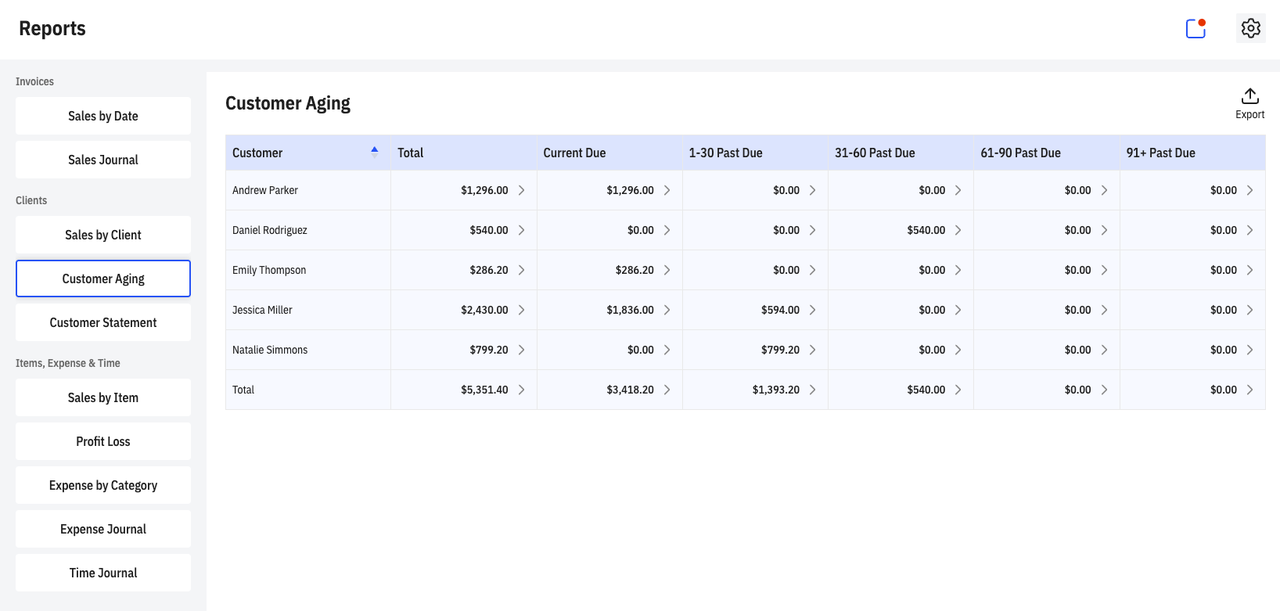
This can help you see whether most of your unpaid balance is relatively recent or whether older invoices are making up a significant part of the amount owed.
For example, you might find that most unpaid invoices are recent, while a few older invoices account for a large share of your outstanding balance. Those older invoices may deserve more immediate attention.
The report can also help you identify where your outstanding balance is coming from. If a particular customer has several older unpaid invoices, you can review those invoices and decide whether they need follow-up.
So, while the Unpaid filter helps you find unpaid invoices, Custom Aging helps you understand the age of those unpaid balances.
Use Sales Journal to See When Unpaid Sales Are Concentrated
You may also notice that your unpaid invoices seem to be concentrated around a particular period.
For example, perhaps several unpaid invoices were issued during the same month. In that case, it can be useful to look at your sales activity during that period.
The Sales Journal lets you review sales by date.
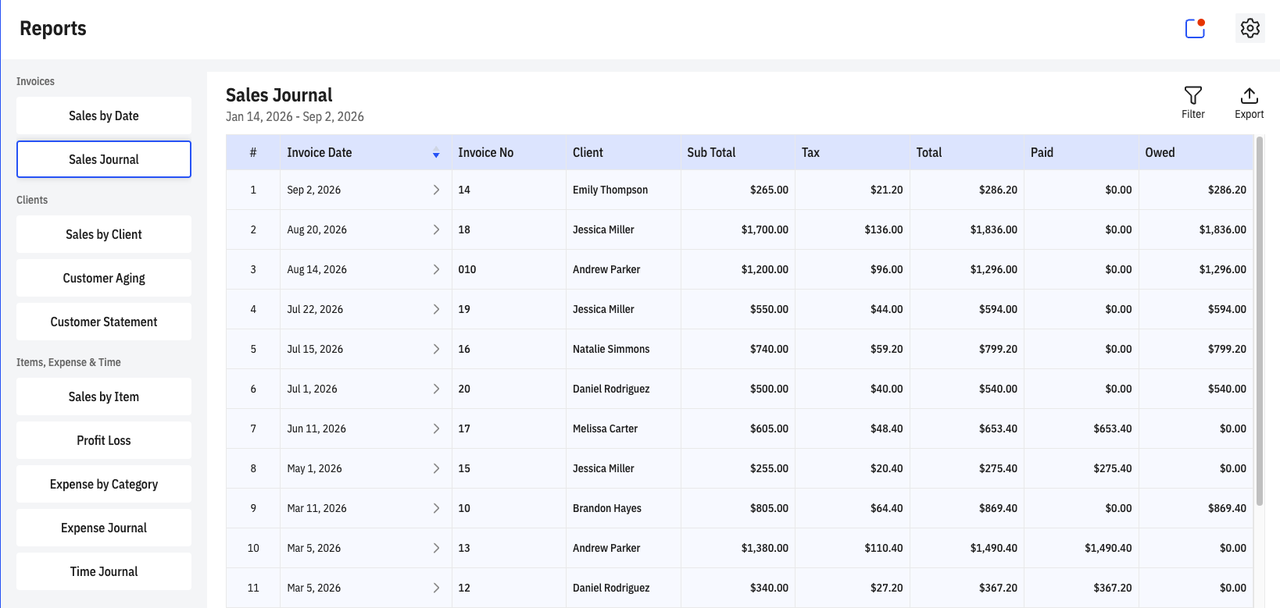
Looking at sales activity by date can help you see when invoices and sales were concentrated. This gives you another way to look at your unpaid invoices and understand when the related sales took place.
For example, if you notice that a large number of unpaid invoices came from the same period, you can take a closer look at the customers and transactions from that time.
This doesn't necessarily tell you why those invoices remain unpaid, but it can help you spot patterns that may not be obvious when you are only looking at individual invoices.
Custom Aging and Sales Journal therefore answer different questions.
Custom Aging: How long have my unpaid invoices been outstanding, and where is the outstanding balance concentrated?
Sales Journal: When did the related sales take place, and are unpaid invoices concentrated around a particular period?
A Simple Way to Track Unpaid Invoices
The way you track unpaid invoices can change as your business grows.
When you only have a few invoices, organizing them as files may be enough. As the number of invoices increases, searching through those files becomes less practical. An invoicing software can give you a central place to manage your invoices and quickly filter the list by payment status.
From there, you can use reports when you need more detail.
The process can be as simple as:
Organize → Filter → Analyze
Keep your invoices organized so you can find the records you need. Use the Unpaid filter when you want a quick list of invoices that still need payment. Then use Custom Aging and Sales Journal when you want to understand your outstanding payments in more detail.
You don't have to analyze every invoice every time. Start with the information you need, and use the reports when you want a clearer picture of your unpaid invoices.
Most Popular Pages

Try Invoice Zip Today
Start Sending Invoices, Building Reports, Saving Office
Time and Get Paid Faster.
