


Understanding Invoices With Balance Due
6min read
|
Aug 28, 2026
A balance due on an invoice shows how much money the customer still needs to pay.
This may seem simple, but invoices can become confusing when a customer has already paid a deposit, received a discount, or made a partial payment. Showing the balance due clearly helps both sides understand what remains unpaid.
A clear balance due also helps prevent duplicate payments and unnecessary conversations. When customers can see the original amount, previous payments, and remaining balance in one place, they are more likely to approve the invoice quickly.
What Does Balance Due Mean?
Balance due is the amount that remains unpaid after all deposits, payments, discounts, credits, and adjustments have been applied.
For example, if the total project cost is $2,000 and the customer has already paid a $500 deposit, the balance due is $1,500.
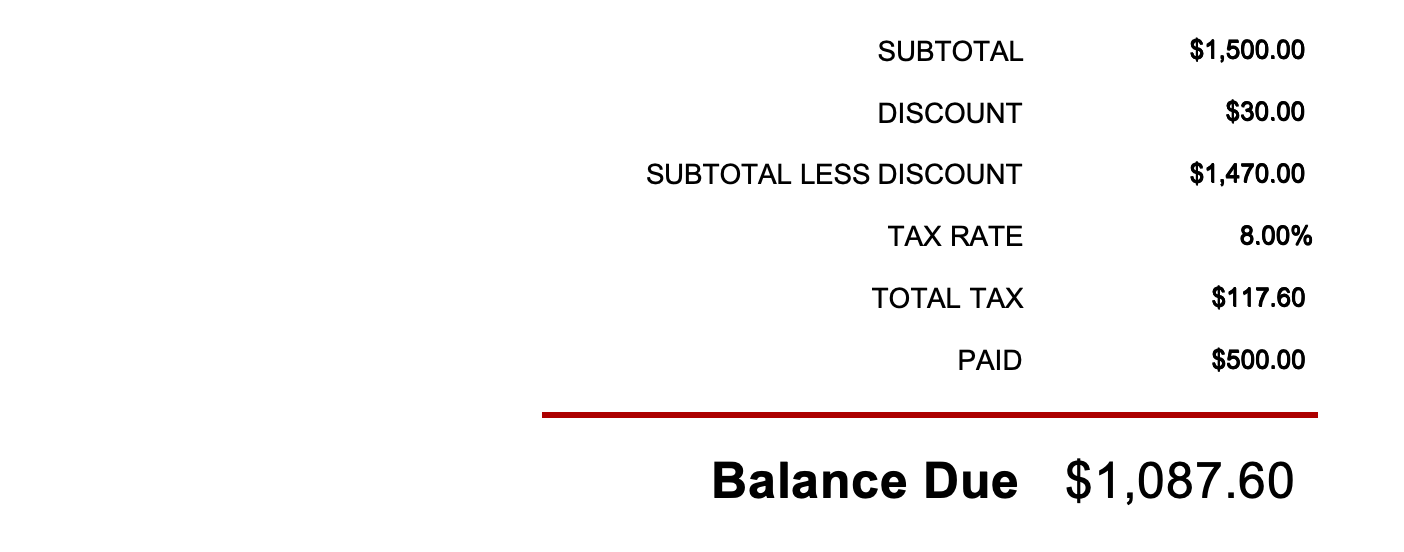
A clear invoice should show the calculation rather than only displaying the final amount. This makes it easier for the customer to understand why the current amount is different from the original project price.
How Is the Balance Due Calculated?
The basic calculation is:
Total charges − discounts − deposits − previous payments + additional fees = balance due
For example, a project may have a total cost of $2,000. The customer has paid a $500 deposit, and an additional approved service costs $250. The remaining balance is $1,750.
Showing each part separately makes the invoice easier to review. It also creates a useful record if the customer, accountant, or project manager needs to check the payment history later.
Balance Due vs. Total Amount
The total amount on an invoice is not always the same as the balance due.
The total amount may refer to the full value of the products or services. The balance due reflects what the customer still needs to pay after earlier payments or adjustments.
For example, a project may have an original value of $5,000. The customer has already paid a $1,500 deposit and an additional payment of $1,000. The balance due is $2,500.
The customer should not be asked to pay the full $5,000 again. Showing the payment history clearly helps avoid this type of mistake.
What Should an Invoice With Balance Due Include?
An invoice with a remaining balance should explain how the amount was calculated.
It should include:
- The original invoice amount
- Discounts
- Taxes
- Deposits
- Previous payments
- Credit amounts
- Additional charges
- Current balance due
- Payment due date
If there are multiple payments, include the dates and amounts of previous payments. You can also include the payment method or transaction reference when it is useful for recordkeeping.
The current balance should be displayed in a visible location, usually near the bottom of the invoice. Avoid making the customer search through several sections to find the amount they need to pay.
Balance Due for a Deposit-Based Project
Deposits are common for construction, consulting, custom orders, and larger projects.
An invoice may show the project total as $8,000, a deposit of $2,400, a progress payment of $2,000, and a balance due of $3,600.
This format helps the customer understand how the remaining balance was calculated. It also makes it easier to connect the final invoice to the original agreement.
For larger projects, you may want to explain when each payment was made and which stage of the project it covered. This is useful when a project lasts several months or includes multiple teams.
A deposit should not disappear from the payment record. It should remain visible until it has been applied to the final balance.
Balance Due for Partial Payments
A customer may pay an invoice in several installments.
For example, the original invoice may be $3,000. The customer makes a first payment of $1,000 and a second payment of $750. The remaining balance is $1,250.
Each partial payment should be recorded with its payment date and method. If the customer pays by bank transfer, you may also include the transaction reference.
Updating the invoice after every payment helps prevent confusion. It also gives the customer a current record of what has already been paid and what remains outstanding.
What If the Customer Pays Too Much?
If a customer pays more than the amount due, the invoice should show the overpayment.
You may:
- Refund the extra amount
- Apply it to another invoice
- Keep it as a customer credit
- Confirm the customer’s preference
Do not silently apply an overpayment without communicating with the customer. Different customers may prefer different solutions, and the correct accounting treatment may depend on your business process.
What If the Invoice Has a Credit?
To document a credit for returned products, cancelled services, damaged goods, pricing adjustments, or previous overpayments, you typically issue a credit memo. Show the applied credit clearly on the invoice so the customer can see how it affects the balance due. For example, if the original balance is 1,000 and a 150 credit is applied, the updated balance due is $850. Referencing the CM No. and the reason for the credit can make the adjustment easier to understand.
Show the credit clearly on the invoice so the customer can see how it affects the balance due.
For example, if the original balance is $1,000 and a $150 credit is applied, the updated balance due is $850. Referencing the reason for the credit can make the adjustment easier to understand.
Common Balance Due Mistakes
Avoid:
- Forgetting to subtract a deposit
- Charging the full amount after a partial payment
- Hiding previous payments
- Applying a credit to the wrong invoice
- Showing different balances in different documents
- Failing to update the invoice after payment
- Forgetting to include the due date
A mismatch between your records and the customer’s records can delay payment. Before sending an updated invoice, compare it with your payment records and the original agreement.
How to Communicate the Balance Due
Use clear wording such as:
“Your remaining balance is $1,500, after applying the $500 deposit received on June 1.”
This is better than simply writing “Amount due: $1,500” when the customer may not know how the amount was calculated.
If the invoice includes several adjustments, add a short note that explains the most important changes. Clear communication can prevent the customer from asking for a revised invoice.
How Invoice Software Can Help
Invoice software can help you record deposits, track partial payments, apply credits, calculate the balance due, and mark invoices as paid or partially paid.
It can also help you send updated invoices and reminders based on the current balance rather than the original project amount.
Invoice Zip helps businesses manage invoices and payment records in one place.
Final Thoughts
The balance due shows what the customer still needs to pay after previous payments, deposits, discounts, credits, and adjustments have been applied.
A clear invoice should show the original amount, previous payments, deposits or credits, additional charges, current balance due, and payment deadline.
When the calculation is easy to understand, customers are more likely to approve and pay the invoice without questions.
Most Popular Pages


Try Invoice Zip Today
Start Sending Invoices, Building Reports, Saving Office
Time and Get Paid Faster.
